WooCommerce wholesale pricing by user role: B2B prices without a second store
You sell to the public and you sell to the trade, and the two do not pay the same. Your wholesale customers have negotiated rates, buy in volume, and expect to see their prices when they log in — not to email you for a quote every time.
WooCommerce has one price per product. It has no concept of who is looking.
So most stores end up doing one of three things, and all three are worse than they look: running a second WooCommerce install for trade (two catalogues, two stocks, two of everything to keep in sync), handling wholesale off-site by email and manual invoices (which stops being viable the moment you have more than a handful of accounts), or handing out coupon codes to trade customers (a code any of them can forward to anyone).
There is a fourth option: keep one store, and make the price depend on the customer's role.
What you need before you start
A WordPress user role for your trade customers. Something like Wholesale or B2B Customer, assigned to those accounts.
This is the one piece that is not Alondra's job. It reads the roles that exist on your site and uses them as a condition — it does not create or manage them. If you don't already have a trade role, you can add one with any role-management plugin or a few lines in your theme, and assign it to the relevant users from Users in the WordPress admin.
If your wholesale customers are a short, stable list of specific accounts rather than a whole segment, you can skip the role entirely — the rules editor takes individual users too, and step 3 below shows where.
How Alondra thinks about this
Before the walkthrough, the model, because it is small and it explains everything else.
A tiered pricing group is two things stapled together: a list of quantity ranges with their prices, and a list of rules that decide when that list applies. Two panels on one screen, and wholesale pricing only needs a couple of fields in each.
In the rules panel, the two that matter here are HAS PROFILE, where you pick one or more roles, and USER IS, which takes named accounts instead. Everything else in there — products, categories, tags — narrows the group down to part of your catalogue, and you can leave all of it alone for now.
Setting up wholesale prices
Go to WooCommerce → Tiered Pricing and add a new group.
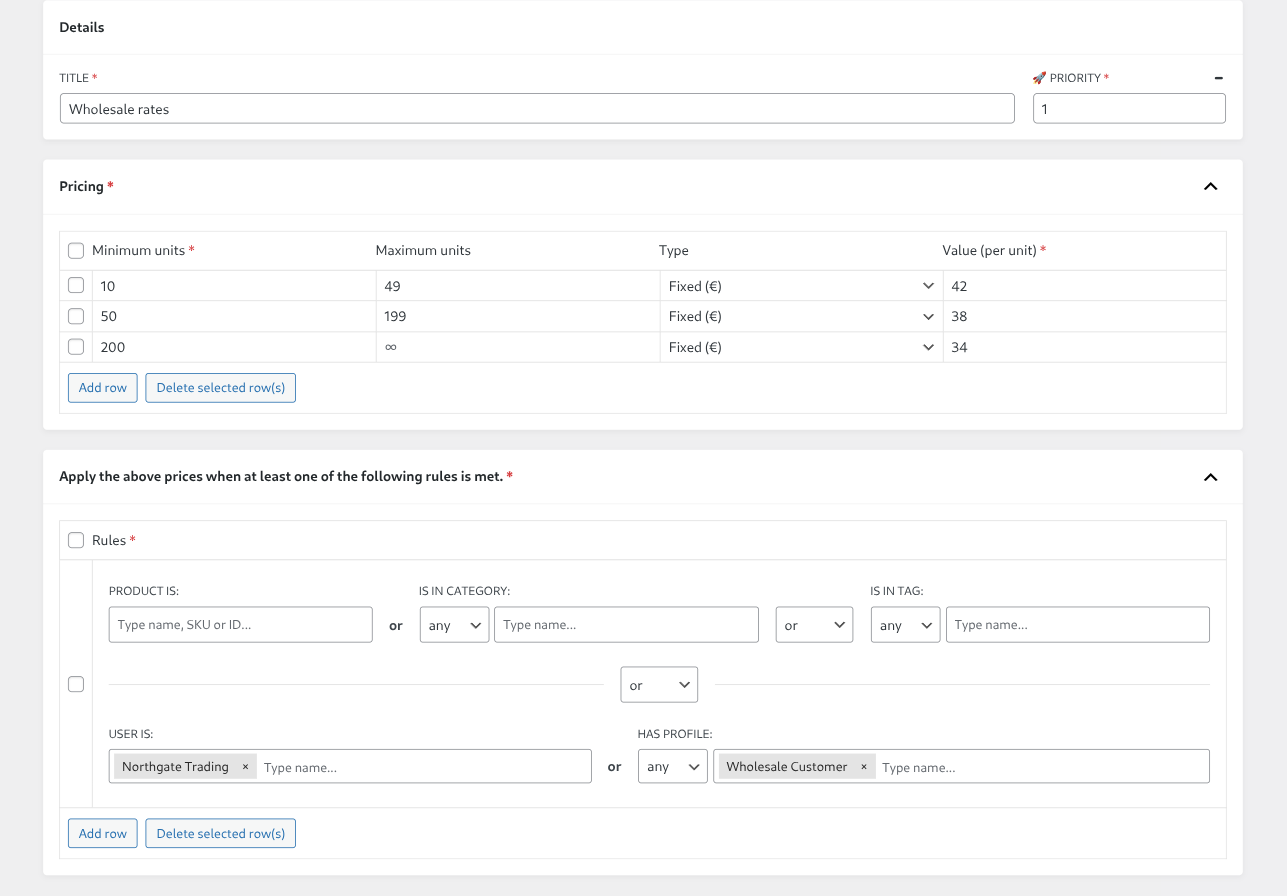
1. Name it. The title is only ever shown to you, in the admin list. Name it after the deal, not the product — Wholesale rates beats Discount 1 when you have fifteen of them.
2. Add your quantity ranges. Each row is a minimum quantity, a maximum, and the unit price that applies between them. A wholesale ladder usually looks like this:
| Minimum units | Maximum units | Value (per unit) |
|---|---|---|
| 10 | 49 | 42 |
| 50 | 199 | 38 |
| 200 | — | 34 |
Leave the last row's maximum empty and it runs to infinity. Fixed prices like these are free.
Pro adds a second type for the same rows, Percent (%), for terms you quote as a discount off list. One thing to get right there: the number you type is the percentage of the base price the customer pays, not the discount they receive. Type 85 and you are giving 15% off. Type 40 and you are giving 60% off.
3. Add the rule. In the rules panel, put your trade role in HAS PROFILE. If a few named accounts should get the same prices without carrying the role — legacy customers, a distributor you set up by hand — add them in USER IS, in the same rule. The two are joined by or: a customer matching either one gets the prices.
Leave the rest of the panel empty and the group applies to your whole catalogue for those customers. Targeting by role or by user costs nothing: both are in the free version, along with targeting by product, variation, category and tag.
4. Publish. The prices are live immediately.
What each customer now sees
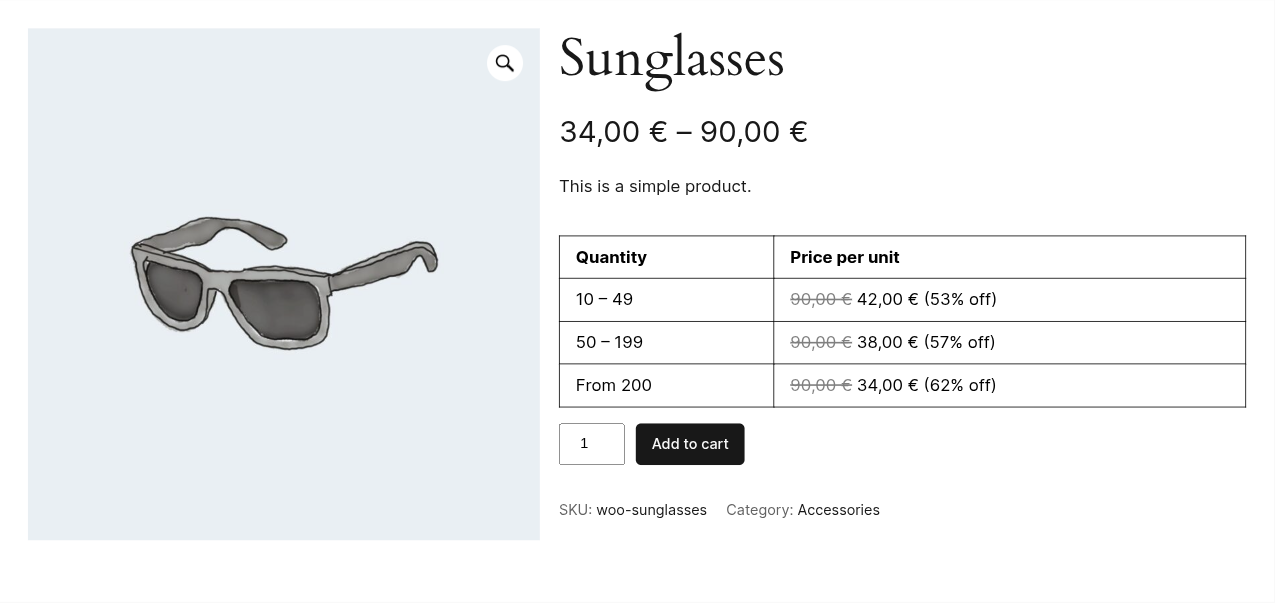
A logged-in wholesale customer opens any product and sees the price ladder on the product page. They can click a tier to set that quantity straight into the cart. The price they were shown is the price they are charged — it carries through to the cart and to the order, not just the product page.
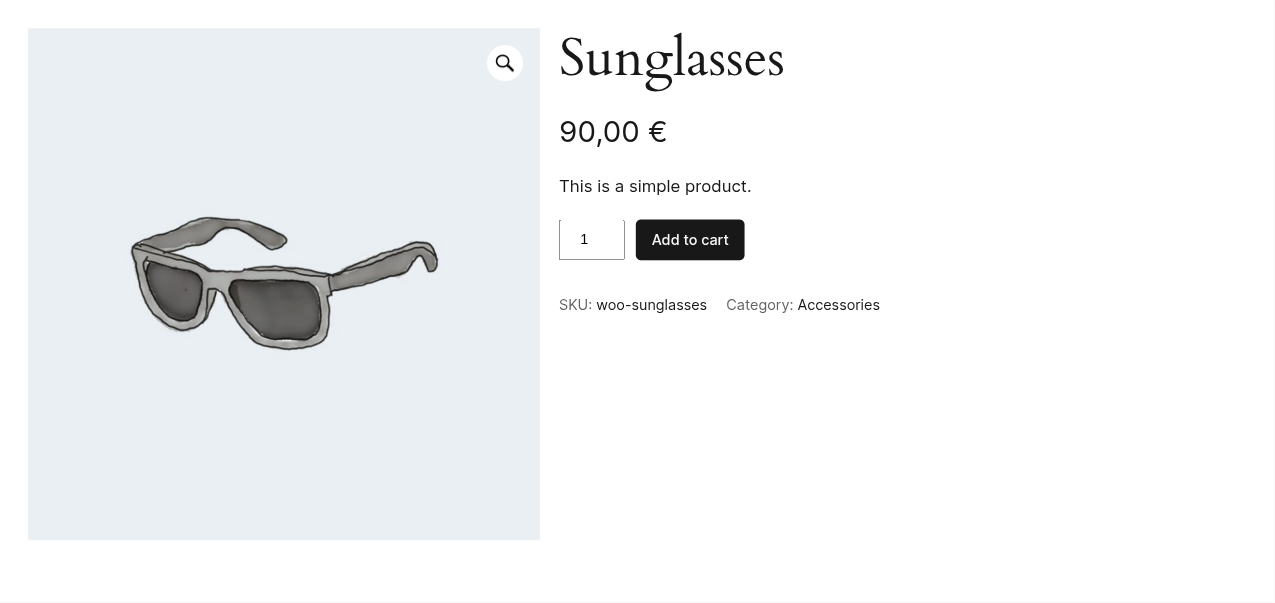
Everyone else — retail customers, and anyone browsing logged out — sees your normal price and no ladder at all. The rule did not match, so the group simply does not apply. Nothing leaks.
That is what makes this work on a single store: the same catalogue, the same product pages, two different price lists, decided by who is logged in.
Signed in as a wholesale customer — the ladder is there, and the price shown at the top already starts at the lowest tier:
The same product, same URL, for everyone else — one price, no ladder, no sign that trade rates exist:
Going further
Several trade tiers. If you run Silver and Gold wholesale rates, that is one group per role, each with its own ladder. Nothing special required.
Wholesale on part of the catalogue only. Add products, categories or tags to the same rule alongside the role. All of those conditions are free, and the free version joins them with or — any one of them matching is enough. Pro is what lets you change that to and, so a group can require the role and the category together. Targeting a whole category has its own guide, including the trap that subcategories do not inherit.
When two groups both match. A customer with the trade role buying from a category that has its own group matches both. The Priority field decides which one wins; it is a Pro feature. On the free version, keep your groups from overlapping in the first place.
Percentage instead of fixed prices. If your trade terms are a discount off list rather than a fixed rate per unit, that is the Pro version.
Worth knowing
- Roles only apply to logged-in users. A trade customer who is not signed in is just a visitor, and sees retail prices. That is usually what you want, but it means wholesale accounts have to log in before they price up an order.
- The role has to exist before the rule can use it. If you delete or rename a role later, revisit the groups that referenced it.
Free or Pro
Everything the core setup needs is in the free version: fixed price ladders, the rules editor with role targeting, and the price table on the product page.
Pro is what you reach for when the pricing gets more political than the ladder — percentage rates, priority between overlapping groups, and logic inside a rule, the extra layouts, and live price updates as the customer changes quantity. The full comparison has every row.
If you are still deciding how to approach pricing on your store at all, the overview of every way to do tiered pricing in WooCommerce covers the alternatives and where each one breaks. And the full documentation walks the group editor field by field.