Tiered pricing for variable products and variations in WooCommerce
Simple products are easy. You set a quantity ladder, the customer buys ten, they get the ten-unit price.
Variable products are where it stops being obvious. A t-shirt in three colours and three sizes is one product with nine variations, each with its own stock, its own SKU, and possibly its own price. So when you say "ten units gets a discount", which ten? Ten of the blue medium? Ten across the whole t-shirt?
WooCommerce does not answer that, because it has no quantity-based pricing at all. But a plugin that adds it has to answer it, and the answer changes how you set the thing up. This walks through it with Alondra.
The short version
Three things decide everything else:
- A rule can target a single variation or the parent product, and the parent means all of its variations.
- Quantity is counted per variation, never pooled across the parent.
- The price table appears on the product page only once the customer has picked a full variation.
The rest of this article is those three, with what they mean in practice.
Targeting the parent, or one variation
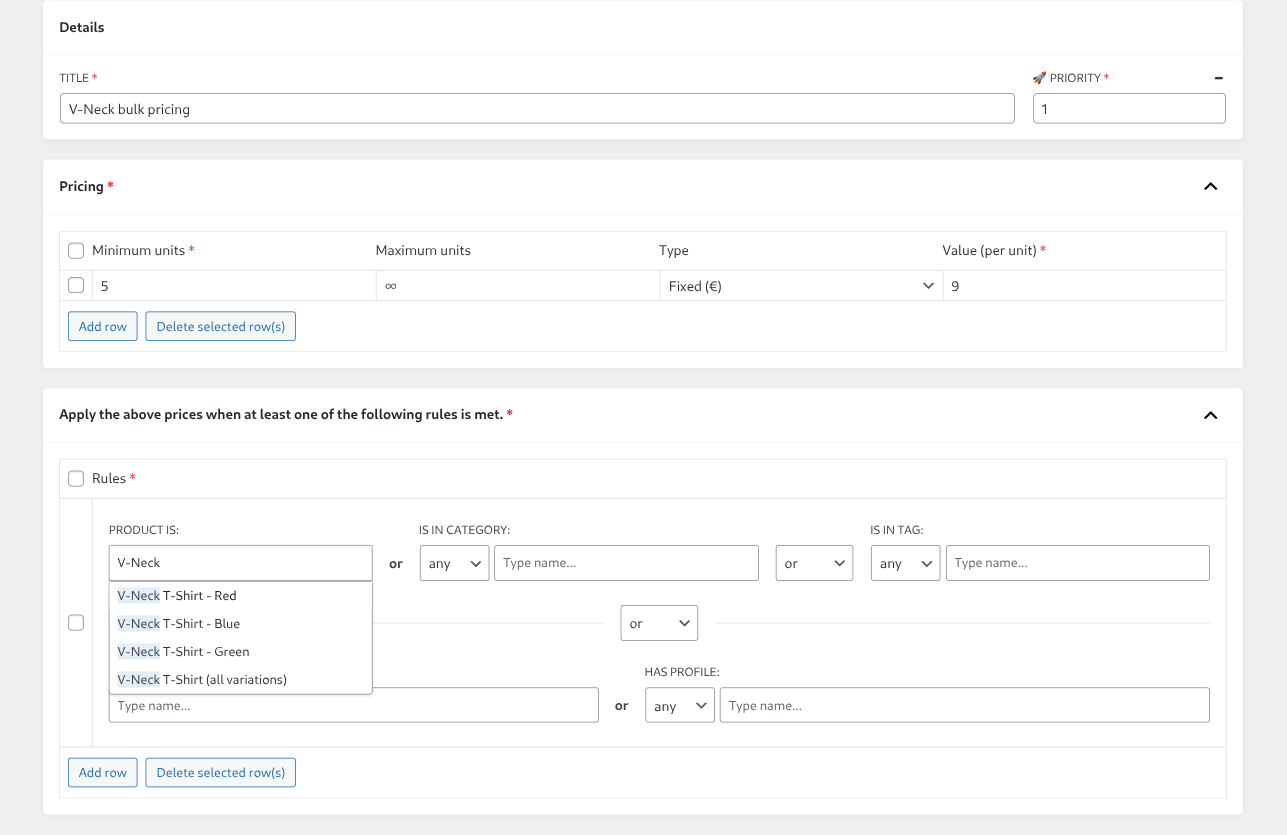
Start a group in WooCommerce → Tiered Pricing, add your quantity rows, and go to the rules panel.
When you type a variable product's name into PRODUCT IS, you get more results than you expected. For a t-shirt called V-Neck T-Shirt the list offers each variation by name — V-Neck T-Shirt - Blue, V-Neck T-Shirt - Red, and so on — plus one entry for the parent, labelled V-Neck T-Shirt (all variations).
That last one is what you want most of the time. Pick it and the ladder covers every variation of that product without you listing any of them — including variations that do not exist yet. Add a fourth colour next month and it is priced the moment you create it.
Pick individual variations instead when the deal is genuinely narrower — clearing one colour, say, or a size that overstocks.
On prices, one thing to watch: a fixed price is an absolute amount, so if your variations have different base prices, a fixed ladder flattens them. A variation at 15 and a variation at 20 both land on exactly the tier price once they qualify. That is fine when your variations all cost the same, and probably not what you want when they don't — percentage pricing, which is Pro, keeps each variation's own price as the starting point.
Quantity counts per variation
This is the one that catches people, and it is worth being exact about, because it decides whether your deal fires at all.
The quantity that picks the tier is the quantity of that one variation in the cart. Quantities of different variations are never added together, even when they belong to the same product and the rule targets the parent.
A ladder that starts at 5 units, with the rule on the parent t-shirt:
| In the cart | What the customer pays |
|---|---|
| 3 blue + 3 red | Nothing discounted. Six shirts, but no single variation reached 5. |
| 5 blue + 3 red | The blue five drop to the tier price. The red three stay at their normal price. |
If your customers buy in mixed batches — a spread of sizes making up one bulk order — a ladder starting at 5 will feel broken to them, because their twenty-shirt order is four lots of five different variations and none of them qualifies. Set the thresholds against how a single variation actually sells, not against the order size you have in mind.
What the customer sees
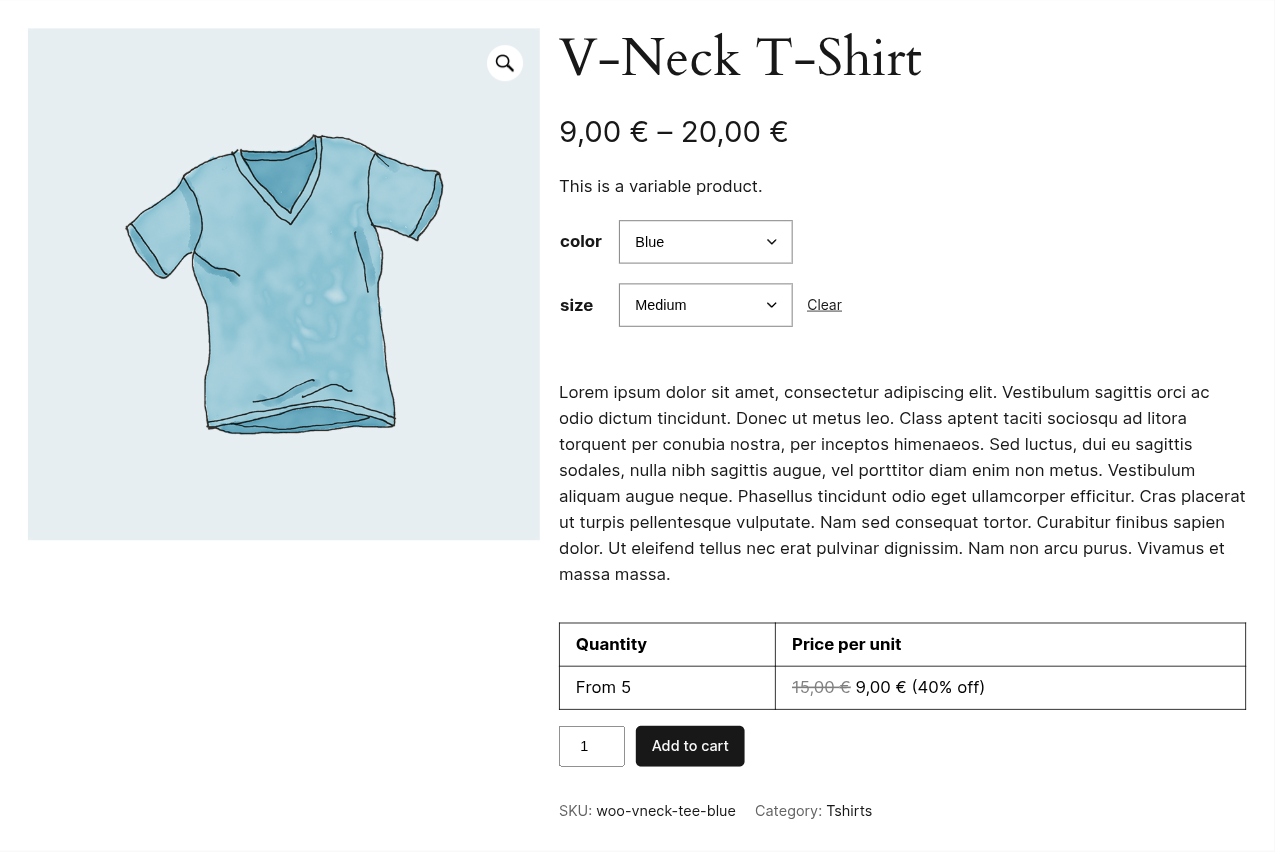
On a variable product the price table does not appear straight away. Until the customer has selected every attribute — colour and size, not just colour — there is no variation to price, and nothing is shown.
Once the selection resolves to a real variation, the table appears with that variation's ladder, and it updates when they switch to a different one.
The parent product's price is affected too. A t-shirt whose variations run from 15 to 20 will show a range starting at the tier price once a group applies, both on the product page and anywhere the catalogue lists it — so the discount is visible before anyone opens the product.
The price shown in the table is the price charged: it follows through to the cart and the order.
Targeting variations without naming them
PRODUCT IS is not the only way in. A rule can also point at a category or a tag, and both cover variable products the same way — every variation of every product in that category is priced, including products added later. That is usually the better tool for a range-wide deal; the guide to discounting a whole category covers it, including the trap that subcategories do not inherit.
Conditions in the same rule are joined with or in the free version, so adding a category alongside your product widens the group rather than narrowing it. Requiring both together is the Pro and.
Free or Pro
Everything above works on the free version: variation and parent targeting, fixed ladders, and the price table on the product page. Support for variations is not an upgrade.
Pro is percentage pricing, which is the one that matters here if your variations have different base prices, plus priority between overlapping groups, and logic, the extra layouts, and live price updates as the quantity changes. The full comparison lists every row.
For the wider picture, the overview of tiered pricing in WooCommerce covers the alternatives and where each one breaks, and the documentation walks the group editor field by field.