◦ Frequently asked questions
The things people ask before buying.
Pre-Sale Question 9
Absolutely! We offer a 7-days free trial period where you can use all the PRO features without any restrictions. Credit card is required but we will not charge you any payment until the end of that period so you have time to decide if the plugin fits your needs.
You can cancel your subscription anytime.
Yes, if you decide within 30 days of purchase our plugin is not for you, we’ll happily refund you in full.
Can I try it before commit?
Absolutely! We also have a 7-day free trial period (credit card required) with full features. That way, if you’re not sure if the plugin is for you, try using it for a week and see what you think. The PRO version starts right after that period ends. Keep in mind that even if you’re not satisfied with the plugin, you’re still welcome to use the features that are available for free.
The PRO plugin is not working for me
If the plugin is not working, and you’ve not yet spoken to our support team, we’re more than happy to take a look for you. Perhaps we can help in some way to get things working well for you again.
If we cannot fix the issue (this is rarely the case), then we’ll happily issue you a refund. If we can fix the issue but you’re still not happy, we can still issue you the full refund; at least at this point, we’ve solved a bug for other users of the plugin.
In any case you can use the support form on your Customer Dashboard in Freemius to ask for assistance. You can find the login details in your email.
I just want a refund
We really want you to be happy with your purchase and will try really hard to make that happen. But, if for any reason you’re not completely happy or you’re sure there’s nothing we can do, we do offer a 30-day money-back guarantee. To do so, please get in touch.
How long will it take until I see the refund?
You can request a refund transactions up to 30 days after the transaction was successfully processed and payment was created. While some refunds may be instantaneous, credit refunds can take 5–10 business days to show up in your credit card statement.
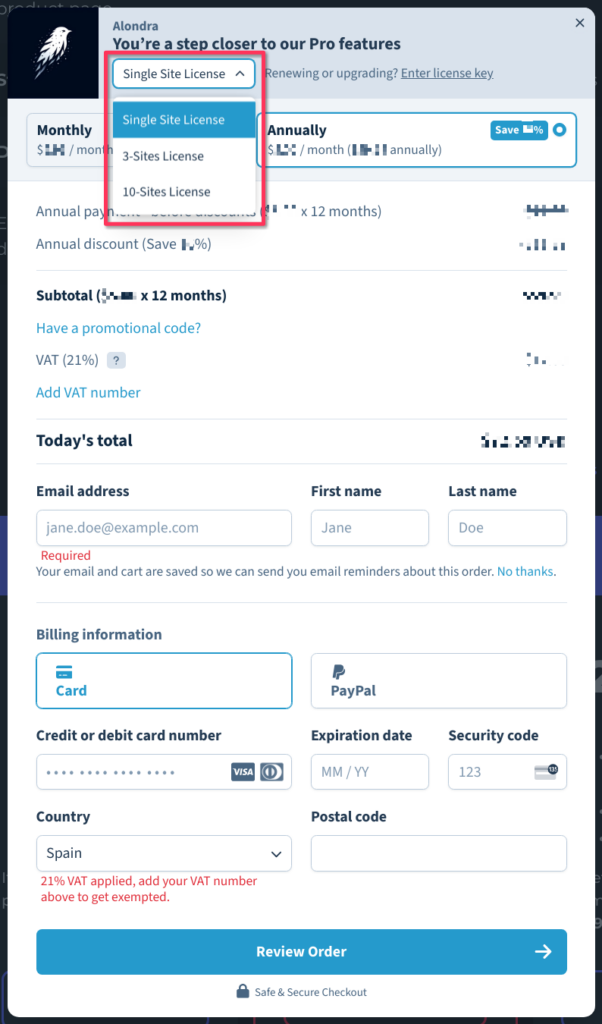
Yes, we do (and they’re heavily discounted)! When the checkout modal opens you can choose between 1 Site, 3 Sites, and 10 Sites under Plan Selected at the top of the modal.
FREE covers the whole core of the plugin: fixed prices for a range of quantities, the rules editor with every targeting criterion — products, variations, categories, tags, users and roles — the price table on the product page, and the data cache. PRO adds percentage prices, priority between overlapping groups, and logic inside a rule, control over where and how the prices are displayed, and live price updates as the customer changes quantity.
Check out this link to see a comparison table for Alondra.
With Alondra, you can define a fixed price higher than the original one when you configure the row. With the PRO version you can also use percentage pricing as well. In this case, you must define values above 100 to generate overprice.
Yes. You can offer discounts for individual users or for users who have a role.
For a step-by-step setup — wholesale prices for your trade customers and retail prices for everyone else, on the same store — read this guide.
Yes, you can define a row with price 0 when you define the pricing settings in the group.
No. At this moment, we don't have enough resources to afford that workload.
We are working to provide this service in the future.
Once your license expires you can still use the plugin, but only with the free features. Also you will no longer be able to receive updates or support for the plugin.
However, the support for free features is still available. You can create a support ticket in the WordPress forum. We are answering you ASAP based on our work load.
The data of PRO features in your database won't be lost. We'll keep it in case you can resume the PRO license you don't lost your configurations. If you want to delete all the plugin data from your database there is an option to do it, in the plugin settings page.
Compatibility 3
We have tested the plugin with the most popular themes and builders on the market, ensuring that the components that display the price on the front-end are displayed correctly. Additionally, with the PRO version you can customize the colors and design as well as, if you wish, disable the styles present in the plugin to use your own. So, as long as your theme is well coded and WooCommerce compatible, it should work correctly.
Currently Alondra plugin should be compatible with Multisite out of the box, but it is still pending from being fully tested.
The front and back-end of all our products are translation ready.
License & Subscription 9
Yes. Our system checks against the number of active installs, rather than the specific domain names. You can deactivate the plugin on one domain and then activate it on another domain with no issues. You can do so from within the Plugin Settings page in the WordPress Admin dashboard -> License & Account tab, and then reuse the license in other site.
If you are looking for using the license in a /localhost/staging/dev environment you can do it without counting towards your site activations limit. However, your domain name must reflect one of the allowed TLDs or Subdomains. Check the following articles to know the allowed domains.
/faq#can-i-use-my-licence-in-a-development-environment
Yes. If your domain is localhost (with any port), it will be treated as a localhost domain without counting towards your site linit.
Additionally, all of our licences allow you to use them on staging or development domains without counting towards your site activations limit. However, your domain name must reflect one of the allowed TLDs or Subdomains.
TLDs that are considered as dev or staging:
- *.dev
- *.dev.cc (DesktopServer)
- *.test
- *.local
- *.staging
- *.example
- *.invalid
- *.myftpupload.com (GoDaddy)
- *.cloudwaysapps.com (Cloudways)
- *.wpsandbox.pro (WPSandbox)
- *.ngrok.io (tunneling)
- *.mystagingwebsite.com (Pressable)
- *.tempurl.host (WPMU DEV)
- *.wpmudev.host (WPMU DEV)
- *.websitepro-staging.com (Vendasta)
- *.websitepro.hosting (Vendasta)
- *.instawp.xyz (InstaWP)
Subdomains that are considered as dev or staging:
local.*dev.*test.*stage.*staging.*stagingN.*(SiteGround;Nis an unsigned int)*.wpengine.com(WP Engine)dev-*.pantheonsite.io(Pantheon)test-*.pantheonsite.io(Pantheon)staging-*.kinsta.com(Kinsta)staging-*.kinsta.cloud(Kinsta)
If you want to utilize a license on a dev site that doesn’t fit the criteria listed above you can deactivate the license from within the Plugin Settings page in the WordPress Admin dashboard -> License & Account tab, and then reuse the license in other site.
No. We do not offer any lifetime licenses for our plugins.
The license is an annual (or monthly) subscription and will renew automatically every year (or month, depending on how you selected to pay), unless you cancel it.
It can be canceled at any time. If you cancel the subscription, the plugin will continue to work as normal until the end of the paid-for period.
Once the license expires or reach the end of the paid-for period, you will no longer receive updates or support for the plugin and will still be able to use the plugin all the time you want, but only with the Free features.
However, the support for free features is still available. You can create a support ticket in the WordPress forum. We are answering you ASAP based on our work load.
WooCommerce and WordPress are evolving constantly. A subscription model allows us to continue supporting the latest releases and offer the best support we can.
Additionally, your subscription ensures ongoing access to essential updates, including bug fixes, security patches, and feature enhancements. These updates are crucial for maintaining the stability, security, and functionality of your website. Without them, your site may become vulnerable to security threats or experience compatibility issues with newer versions of WordPress and WooCommerce.
Furthermore, our subscription model enables us to invest in research and development, allowing us to innovate and introduce new features that enhance your online store's capabilities. From improved performance optimizations to integrations with popular third-party services, our team is dedicated to providing you with tools that help grow your business and improve your customers' shopping experience.
By subscribing to our plugin, you're not just purchasing a product; you're investing in the long-term success of your online store. Our commitment to ongoing support and development ensures that you'll always have the resources you need to adapt to the ever-changing landscape of e-commerce and stay ahead of the competition.
Thank you for considering our subscription plan, and we look forward to supporting you on your journey to e-commerce success.
Yes, your subscription will renew automatically every year (or month, depending on how you selected to pay), unless you cancel it.
If you do decide to cancel it, your license will still be valid for the paid-for period; this means you will still be able to enjoy all the Pro features and receive updates and support during that time.
Once the license reach the end of the paid-for period, you will no longer receive updates or support for the plugin and will still be able to use the plugin all the time you want, but only with the Free features.
If you want to cancel your recurring subscription you can visit this article.
Canceling your subscription means when your current license expires (1 year or month from purchase), you will no longer receive automatic updates and priority support. Also you can no longer use the PRO features. You can still using the product but only with the FREE features.
The plugin is not working for me
If the plugin is not working, and you’ve not yet spoken to our support team, we’re more than happy to take a look for you. Perhaps we can help in some way to get things working well for you.
You can use the support form on your Customer Dashboard in Freemius to request assistance. You can find the login details in your email. We are happy to help you with your issue.
If you still wish to cancel your recurring subscription, you can do so by following these steps:
Steps to cancel
- First you need to access to your Customer Dashboard in Freemius.
- From there, you can access all your active subscriptions via the Renewals & Billing section. Active subscriptions will have a green label on the STATUS column and will start with AUTO RENEW ON
<DATE>. - Simply click the row of the subscription that you’d like to cancel to access the subscription’s advanced panel
- Then click the Cancel Auto-Renew button.
- You’ll be prompted with a confirmation dialog, giving you the option to set up an email reminder instead of canceling right away. If you do proceed with the cancellation you’ll get a short feedback form where you can let us know why you are canceling the subscription. Your feedback is appreciated and will help us improve our offering. That said, the feedback is optional, so whether you provide it or not, hit the Send & Cancel renewals button to complete the subscription cancellation.
If your license have been inactive for a while and now you want to renew it, this article is for you.
- First, you need to access to your Customer Dashboard on Freemius. You will find your login details on your email.
- Then, from there:
- Navigate to the Renewals & Billing section.
- To show canceled subscriptions, click the Active filter and select Canceled.
- Simply click the row of the subscription that you’d like to renew to access the subscription’s advanced panel, and then click the Renew button. It will open the checkout dialog and you would need to enter your payment method's details. After the checkout, you would have a new subscription but your license key will remain the same.
First you need to access to your Customer Dashboard by logging into Freemius.
From there:
Navigate to the subscriptions section by clicking on the Renewals & Billing menu item. Locate the subscription that you'd like to upgrade its license's sites limit and select it by clicking on its row. This will open the subscription’s advanced panel. Then, next to the plan, click on the Upgrade to dropdown list and choose the plan and license you'd like to upgrade to. The initial payment will be automatically prorated.
If you’re looking to deactivate a site license, you can do so with this guide.
There are two ways:
From the Wordpress admin dashboard
If you have admin access to the Wordpress site where the license is connected:
- Login to your WordPress dashboard as an admin user
- Go to the Settings menu > Alondra
- Go to License & Account tab
- Click on the "Go to license manager" button
- If your license is correctly activated you will see this "Deactivate button" at the top right corner.
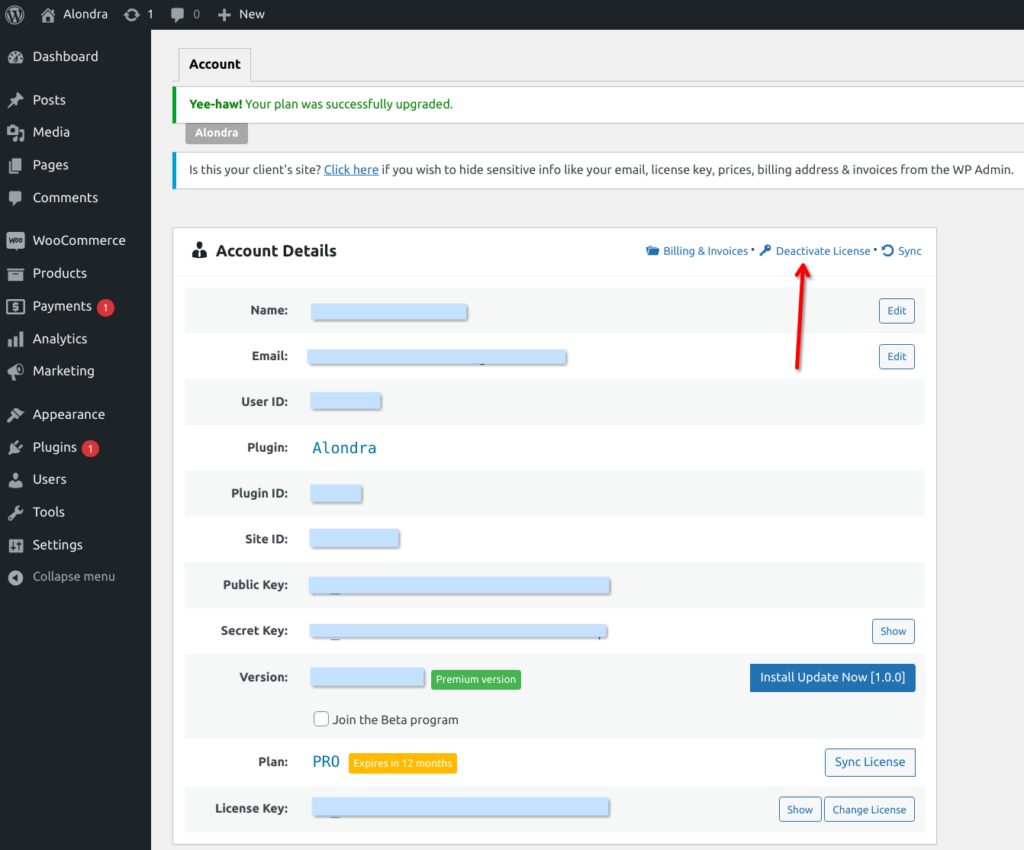
- Click the "Deactivate License" button.
- Click Ok on the confirmation message and now you have that license ready to use in any other Wordpress site.
From your Customer Dashboard from Freemius.
Let’s say you’ve purchased a 1-site license for the Alondra plugin Alondra. You have it on one website, but you no longer have access to that site, or you just want to switch your license, to a different site. Here’s how you do it:
- Login into your Customer Dashboard on Freemius
- Go to the web Websites or Download section.
- Click on the row of the website that currently has the license activated. If there are multiple products running on that site, the next screen will show you all of those products. Simply click on the relevant product to open the details panel, where you’ll be able to click the Deactivate button under the LICENSE section.
After the license is deactivated, you’ll be able to reuse it on any other website.
Billing & Invoices 3
We support PayPal and all major Credit Cards.
If you need to change your payment-method or credit card, first you need to access to your Customer Dashboard from Freemius. You can find your login details in your email.
From there:
Navigate to the subscriptions section by clicking on the Renewals & Billing menu item. Locate the subscription that you'd like to update its payment method and select it by clicking on its row. This will open the subscription’s advanced panel. Then, click on the Update button next to the payment method, and checkout with your new payment method. The initial payment will be automatically prorated based on the next renewal date.
If you didn't enter a Tax / VAT ID during checkout, then it's entirely possible to do it afterward. It is often important to have this identifier displayed on invoices you receive after a purchase.
First you need to access to your Customer Dashboard by logging into Freemius. From there:
Go to My Profile and simply update the billing information. Now, if you go to the Orders History, the invoices will include your Tax / VAT ID.
First you need to access to your Customer Dashboard by logging into Freemius. From there:
You can access all of your payments in the Orders History section. To get a PDF invoice of a payment, just click the Invoice button of the payment’s record.